Write the component. Atlas writes the scenarios and tests every one.
Atlas reads your Pyreon components and their prop types, derives a scenario for every variant, and runs six checks on each: accessibility, interaction, leaks, SSR parity, reactivity coverage and a visual snapshot. You get a workbench, a static docs site and a catalog your coding agent can read, and a check that could not run is reported as not run, never as passed.
bun add -D @pyreon/atlas - story files to write
- 0Author only what a type cannot say: a play script, a named state.
- checks per scenario
- 6a11y (static + axe-core), interaction, leak, SSR parity, reactivity coverage, snapshot.
- verdicts
- pass · fail · unverifiedA failing scan exits 1. A skipped check never counts as a pass.
- outputs
- workbench · static site · agent catalog
atlas-catalog.jsonandatlas-agent-guide.md, also served over MCP.
- 8 scenarios derived from one 17-line Button, with no config: Default, three variants, two sizes, Empty and Long content.
atlas scanon a scratch project holding only that Button (the after side of the comparison below), 2026-11-11 - 48 checks on those 8 scenarios after
atlas scanandatlas verify-browser. One failed twice: the static name check and axe-corebutton-name (critical)on the Empty scenario.atlas verify-browser .output: "8 scenario(s) — coverage measured on 8, axe-core run on 8 (1 with violations), 8 baseline(s) created, 0 visual diff(s)" - 44 scenarios across 11 components in the repo's atlas-workshop example, zero story files: 42 verified, 2 failing, exit code 1.
bun atlas scan .on a copy of examples/atlas-workshop, 2026-11-11
synthetic · author-run · M3 Max · record of 2026-11-05
Every result, including where we lose →A catalog that cannot drift, because nobody writes it.
Scenarios come from your types
A
variant?: 'solid' | 'soft' | 'outline' | 'ghost'prop becomes a select control and three scenarios. Rocketstyle dimensions become axes too. Add a value to the union and the next scan has a scenario for it.Every scenario is mounted, clicked and hydrated
The scan mounts each scenario, clicks everything interactive, renders it on the server, hydrates it and compares the DOM.
atlas verify-browseradds axe-core, reactivity coverage and pixel snapshots in real Chromium.Three verdicts, never two
pass, fail or unverified. The summary line names which of the six checks ran (
checks: a11y 7/8 ✗ · interaction 8/8 …) and thenot run:line says why the rest did not. A red scan is a red exit code.Your coding agent reads the same catalog
atlas-agent-guide.mdlists every component's legal prop values and a known-good usage.atlas check Button '{"variant":"solidd"}'answers "did you meansolid?" and exits 1. MCP serves it asget_atlas_catalogandget_atlas_component.
Seven stories to maintain, or zero.
One export per state, rewritten whenever the props change.
// Button.stories.tsx (Storybook 10, CSF3, React)
import type { Meta, StoryObj } from '@storybook/react-vite'
import { Button } from './Button'

const meta = {
  component: Button,
  args: { label: 'Button' },
} satisfies Meta<typeof Button>
export default meta
type Story = StoryObj<typeof meta>

export const Solid: Story = {}
export const Soft: Story = { args: { variant: 'soft' } }
export const Outline: Story = { args: { variant: 'outline' } }
export const Ghost: Story = { args: { variant: 'ghost' } }
export const Medium: Story = { args: { size: 'md' } }
export const Large: Story = { args: { size: 'lg' } }
export const Empty: Story = { args: { label: '' } }
// Add a variant to Button.tsx, then remember to come back here.
// Nothing tells you when you forget.The component is the only file. Real scan output underneath.
import type { VNodeChild } from '@pyreon/core'

export interface ButtonProps {
  /** Visible text. */
  label: string
  variant?: 'solid' | 'soft' | 'outline' | 'ghost'
  size?: 'sm' | 'md' | 'lg'
  onClick?: () => void
}

export function Button(props: ButtonProps): VNodeChild {
  return (
    <button class={`btn btn-${props.variant ?? 'solid'} btn-${props.size ?? 'md'}`} onClick={props.onClick}>
      {props.label}
    </button>
  )
}

// $ atlas scan
// atlas: discovered 1 component(s), 8 scenario(s) — 7 verified, 1 failing, 0 unverified.
//   checks: a11y 7/8 ✗ · interaction 8/8 · ssrParity 8/8 · leak 8/8
//   ✗ button--empty
// a11y [missing-accessible-name]: missing accessible name: "label" is emptyWhat a scan says, word for word.
The examples/atlas-workshop app in the repo: 11 components, no story files, one authored play script. Run under bun, so the leak check runs too.
real output
$ atlas scan .
atlas: discovered 11 component(s), 44 scenario(s) — 42 verified, 2 failing, 0 unverified.
  checks: a11y 12/14 ✗ · interaction 44/44 · ssrParity 44/44 · leak 44/44
  not run: reactivityCoverage, snapshot — browser-only — run `atlas verify-browser` to measure this (a Node scan cannot)
  → atlas-catalog.json
  → atlas-agent-guide.md
atlas: 2 file(s) import a module supplied by a build plugin Atlas does not run (virtual:zero/routes) — typically app entry points.
  Nothing to fix: the import is correct. Atlas cannot load these files, so a component
  defined in one of them would be absent — move it to its own file if you want it catalogued.
atlas: 2 failing scenario(s):
  ✗ button--empty
      a11y [missing-accessible-name]: missing accessible name: "label" is empty
        → Give "label" a non-empty value, or an aria-label if the text is genuinely decorative.
  ✗ badge--empty
      a11y [missing-accessible-name]: missing accessible name: "label" is empty
        → Give "label" a non-empty value, or an aria-label if the text is genuinely decorative.
  Run `atlas verify <Component>` to re-check one component on its own.
$ echo $?
1Keep it. Pyreon renders there too.
Set framework: '@pyreon/storybook' and your Pyreon components render in Storybook with Meta, StoryObj, args, decorators and play functions. Atlas never asks you to migrate stories; run both and move when you want to.
Coming from Storybook?
A play function becomes one authored scenario. The variant stories disappear.
// Button.stories.tsx (Storybook 10)
import type { Meta, StoryObj } from '@storybook/react-vite'
import { expect, fn, userEvent, within } from 'storybook/test'
import { Button } from './Button'

const meta = { component: Button } satisfies Meta<typeof Button>
export default meta
type Story = StoryObj<typeof meta>

export const SubmitsOnce: Story = {
  args: { label: 'Save', onClick: fn() },
  play: async ({ canvasElement, args }) => {
    const canvas = within(canvasElement)
    await userEvent.click(canvas.getByRole('button', { name: 'Save' }))
    await expect(args.onClick).toHaveBeenCalledOnce()
  },
}
// …plus one story per variant, kept in sync by handAtlas runs play instead of its automatic click-walk, and a throw fails the interaction check naming the step: play failed at step "click Save": no button rendered. It hands you root and step and no assertion library, so throw (or bring your own expect). The same scenarios key works in the atlas section of pyreon.config.ts.
// atlas.config.ts: only the case a prop type cannot describe
import type { PlayContext } from '@pyreon/atlas/core'

let clicks = 0

export const scenarios = {
  Button: [
    {
      name: 'Submits once',
      args: { label: 'Save', onClick: () => { clicks++ } },
      play: async ({ root, step }: PlayContext) => {
        clicks = 0
        await step('click Save', () => {
          const button = root.querySelector('button')
          if (!button) throw new Error('no button rendered')
          button.click()
        })
        await step('onClick ran once', () => {
          if (clicks !== 1) throw new Error(`onClick ran ${clicks} times`)
        })
      },
    },
  ],
}
// variant=soft, size=lg, Empty, Long content…: derived, nothing to writeThe workbench, live.
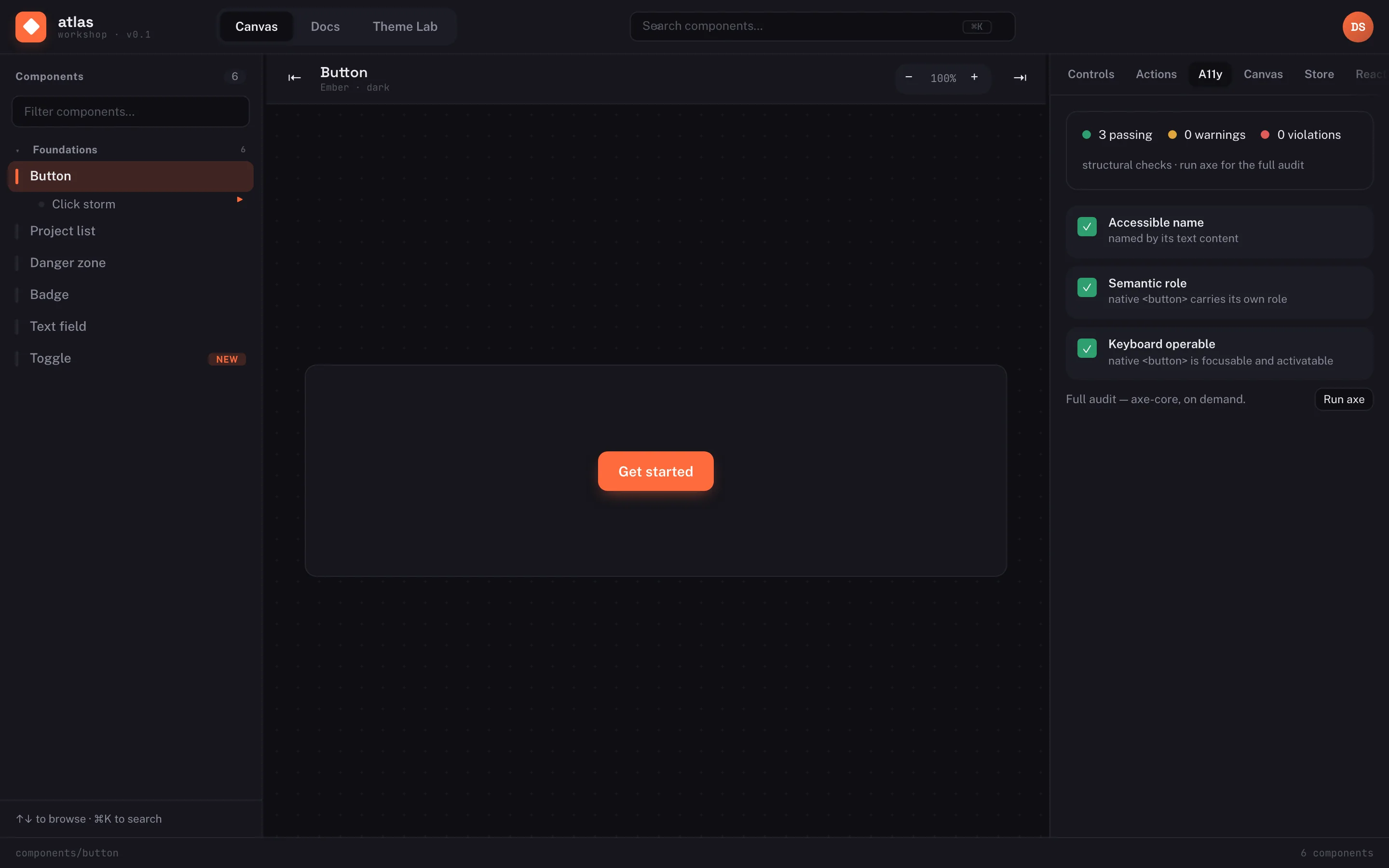
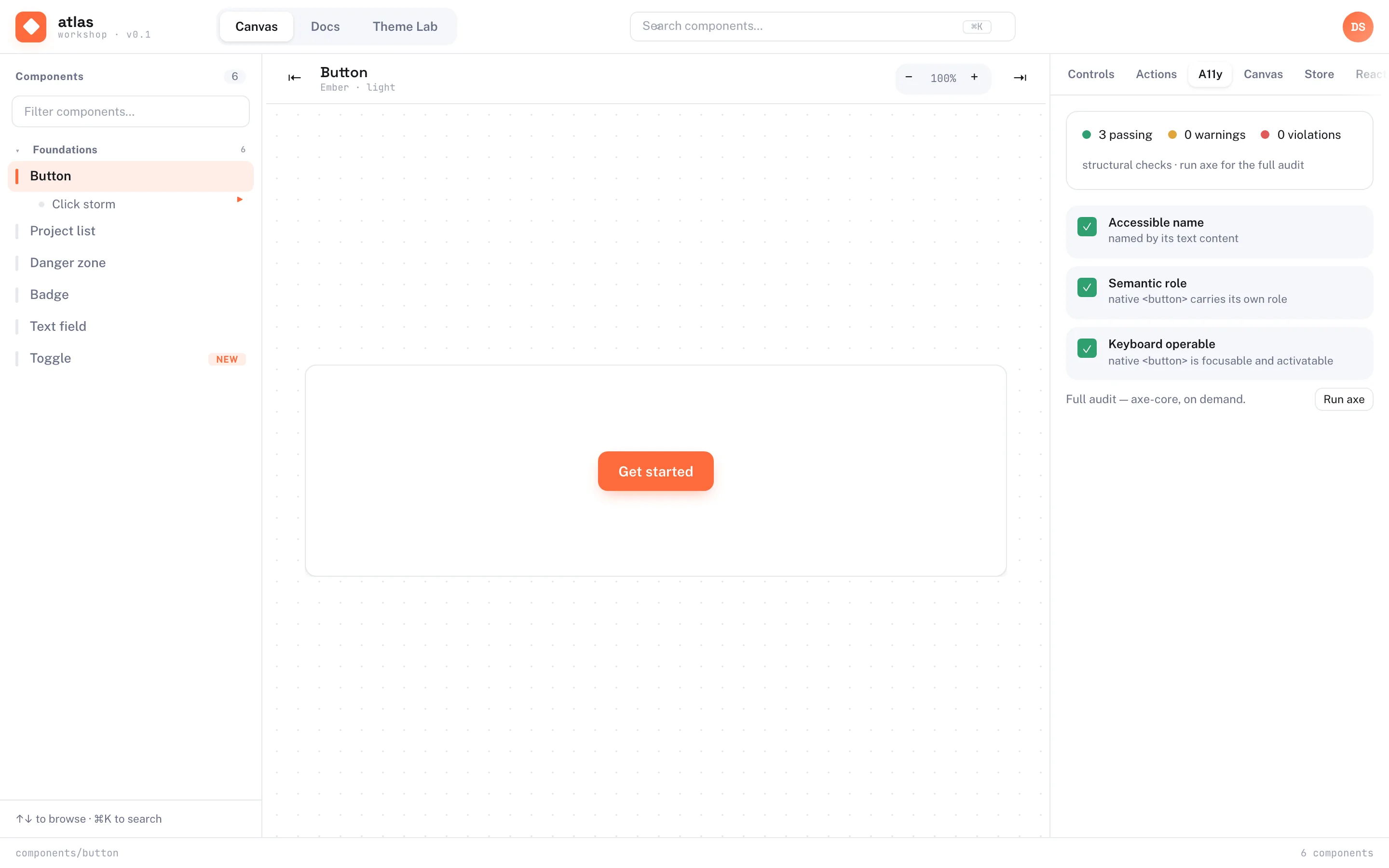
This is the Atlas workbench on a small sample library. Pick a component, change its props in Controls, open the A11y tab, and select the Empty scenario: its verdict dot turns red, and the A11y tab names the problem, a button with no accessible name, with axe-core one click away.
- In the sidebar (☰ on a phone), Button lists its scenarios. Select Empty: its dot is red.
- Open the A11y tab: “Accessible name: interactive element with no name”. Run axe audits the live preview.
- Back in Controls, give it a label and the check passes.
The Atlas workbench loads here. open full screen works without it.
real workbench · built by atlas build from examples/atlas-workshop; scenario verdicts from atlas scan
Workbench, CI gate and agent catalog in one tool.
atlas deva workbench on the real Vite and Pyreon compiler, rescanning when a source file changes- Canvas tools viewports, backgrounds, zoom, a measure overlay, outlines, RTL locales, and forced hover, focus or active states on rocketstyle components
- Panels Controls, A11y with axe-core on demand, an Actions log, the Reactivity Lens and a steppable
@pyreon/storetimeline atlas verify-browseraxe-core, reactivity coverage and visual diffs in real Chromium, merged back into the catalogatlas scan --checkcompares with the committed catalog; a check that stopped running counts as a regressionatlas checkvalidates a proposed usage against the derived contract, with a did-you-mean, for hooks and agentsatlas builda static docs site with the Reactivity Lens and source panels baked in, deployable anywhere- Docs view an autodocs page per component: preview, props table, usage, every scenario as a link
- Monorepos
projectsmerges packages into one catalog; twoButtons stay two, keyedCore/ButtonandAdmin/Button - Empty renders fail a scenario that mounts no DOM fails with
empty-renderinstead of passing quietly
Things to build with it.
The scan exits 1 when any scenario fails a check. verify-browser writes axe-core and coverage verdicts into the catalog and exits 1 on a visual diff. Baselines are machine-specific, so this workflow records them on main and restores them from the runner cache for every pull request; without a stored baseline the first run only records one.
# .github/workflows/components.yml
name: components
on:
  pull_request:
  push:
    branches: [main]
jobs:
  atlas:
    runs-on: ubuntu-latest
    steps:
      - uses: actions/checkout@v4
      - uses: oven-sh/setup-bun@v2
      - run: bun install
      - run: bunx atlas scan .            # exit 1 on any failing check
      - run: bunx playwright-core install chromium
      # baselines are machine-specific: keep them in the runner's cache, recorded on main
      - uses: actions/cache@v4
        with:
          path: atlas-snapshots
          key: atlas-snapshots-${{ runner.os }}-${{ github.sha }}
          restore-keys: atlas-snapshots-${{ runner.os }}-
      # exit 1 on a visual diff; axe-core and coverage verdicts go into atlas-catalog.json
- run: bunx atlas verify-browser . ${{ github.event_name == 'push' && '--update-snapshots' || '' }}variant="solidd"A wrong prop value typechecks in plenty of places and renders as nothing. atlas check reads the committed catalog, so it answers instantly, and exits 1. Put it in a pre-commit hook or your agent's loop. Output below is from the atlas-workshop example.
$ atlas check Button '{"label":"Save","variant":"solidd"}'
Button: 1 problem(s):
  · `variant` must be one of `solid`, `soft`, `outline`, `ghost` — got `solidd` — did you mean `solid`?

$ atlas check Button '{"variant":"soft","colour":"red"}'
Button: 2 problem(s):
  · `colour` is not a prop of Button
  · `label` is required and was not supplied

$ atlas check Button '{"label":"Save","variant":"soft","size":"lg"}'
Button: usage is valid.One URL per component, no server. The Docs source block and the Reactivity Lens are computed at build time and shipped as data, so the deployed site still shows real verdicts.
$ atlas build --out atlas-dist --base /design-system/
# then deploy atlas-dist/ to GitHub Pages, Netlify, Cloudflare or S3Flags, config and the programmatic API.
Every export has a reference page with its signature, an example and the mistakes people make with it.
- --no-mount
- --check
- --json
- --no-write
- --dir
- --update-snapshots
- --no-axe
- --axe-min-impact
- --settle-ms
- --settle-timeout
- --out
- --base
- --title
- title
- projects
- pages
- scenarios
- wrapper
- extensions
- theme
- presets
- matrix
- parts
- browserOnly
- ignore
- alias
- createAtlas
- defineAtlas
- defineAtlasPlugin
- recommendedPlugins
- CHECK_KEYS
- components
- defineComponent
- PlayContext
- AtlasWrapperProps
- VerifyFinding
- FindingCode
- Workbench
- runAxe
- THEMES
- tokens
- get_atlas_catalog
- get_atlas_component
Good to know before you start.
Two and a half checks need a browser
Reactivity coverage and snapshots, and the axe-core half of a11y, run in atlas verify-browser (needs playwright-core). A plain scan marks them not run and says so.
The leak check needs a GC hook
Run the scan under bun, or node with --expose-gc. Without one the leak check skips with that reason rather than passing.
Overlays and parts need a hint
Components that return null on the server go in browserOnly; parts that only render inside a parent go in parts: { TabPanel: 'Tabs' }.
Pyreon components only
Atlas finds Pyreon component shapes and rocketstyle chains. It does not catalog React or Vue components, and styled('div') components are not discovered yet.
What people ask first.
Do I have to give up Storybook?
No. @pyreon/storybook renders Pyreon components in Storybook with the usual Meta, StoryObj, args and play functions. Atlas never imports your stories and never asks you to delete them.
What does "verified" mean here?
At least one check ran on that scenario and none failed. That is why the scan prints a per-check tally and a not run: line: a Node scan runs four of the six checks (three if there is no GC hook), and atlas verify-browser runs the rest. A scenario where nothing ran is unverified, never verified.
Does it run my component code?
Yes, by default: the scan imports each component through Vite to mount it. atlas scan --no-mount stays static and never executes component modules; the runtime checks then report as not run.
Can it check React or Vue components?
No. Atlas reads Pyreon component shapes (function components, nativeCompat wrappers, rocketstyle chains). For a mixed codebase, keep Storybook for the rest.
How long does a scan take?
The atlas-workshop example (11 components, 44 scenarios) scanned in under two seconds on our laptop, one run. The leak check forces garbage collection once per group of about 256 scenarios rather than once per scenario, which is what keeps large libraries fast.
Point it at your components. Find out which ones were never tested.
bun add -D @pyreon/atlas