Drag one node. Nothing else re-renders.
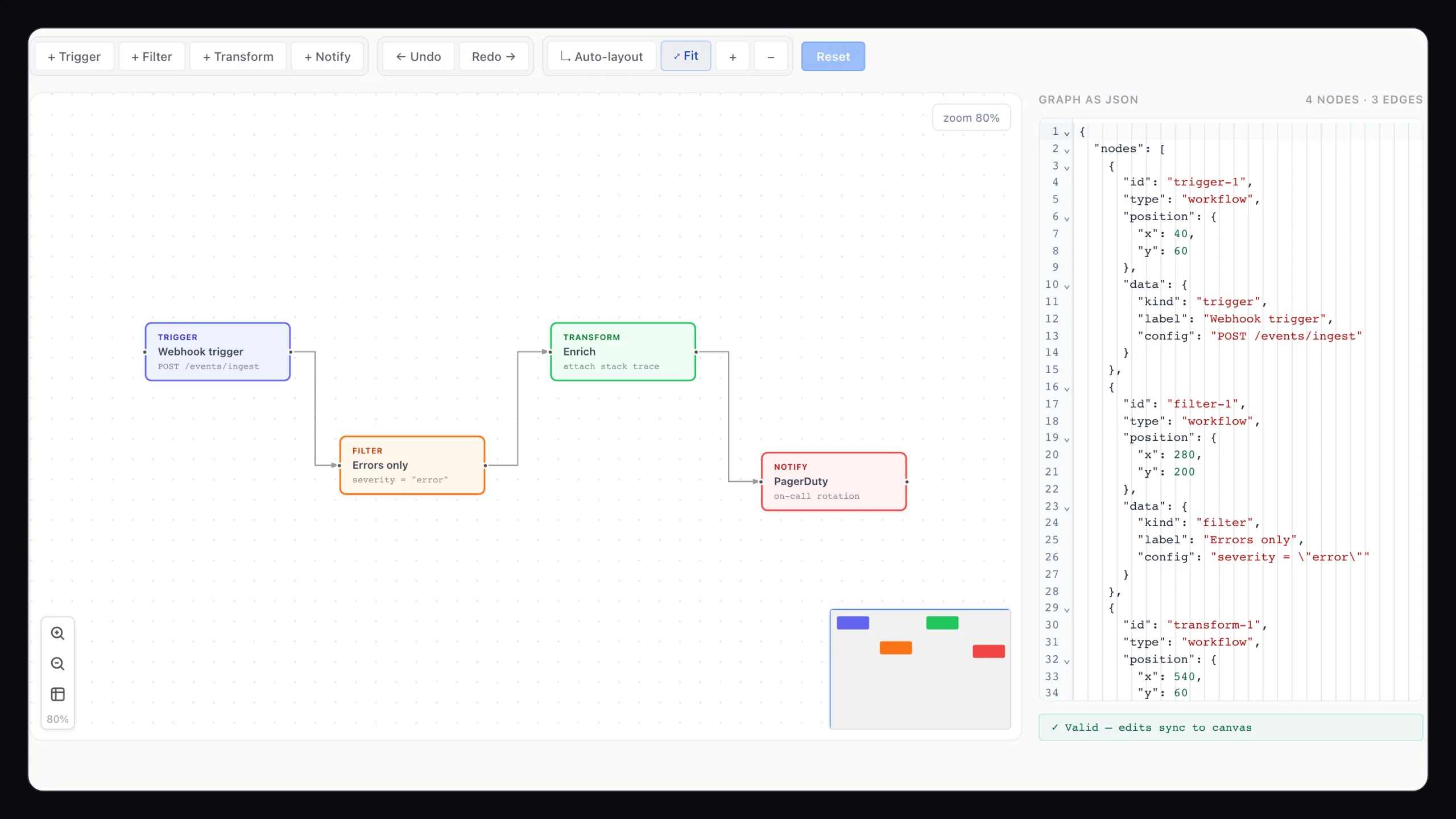
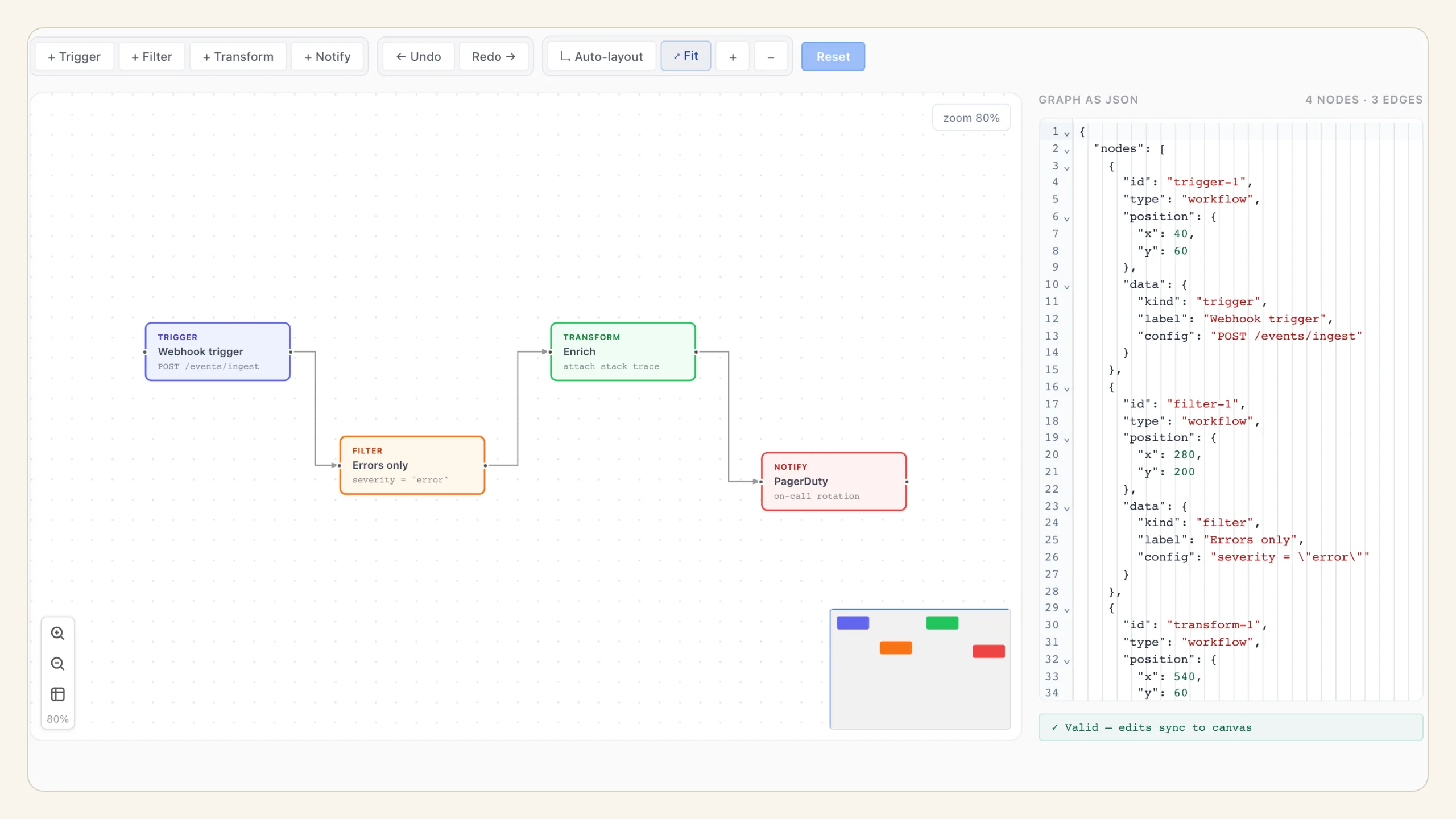
Node editors and diagrams on signals: nodes, edges, handles, pan and zoom, a minimap and seven layout algorithms, all built in. Each custom node mounts once and updates in place, and it beat React Flow 12 on all six operations we timed.
bun add @pyreon/flow - vs React Flow 12
- 6 of 6 operations won500 nodes, 499 edges, one run
- drag a node ×60
- 7.25× faster4.42 vs 32.05 ms
- auto-layout
- 7 algorithms built inno dagre, no elkjs, code-split
- iOS and Android
- native SwiftUI and Compose hostexperimental
- 7.25× faster than React Flow 12 to drag a node through 60 moves in a 500-node graph (4.42 vs 32.05 ms).BENCHMARKS.md §2, Flow vs React Flow 12, final pass, one run, real Chromium, M3 Max
- 5.39× faster to select a node (188 µs vs 1.01 ms).BENCHMARKS.md §2, Flow vs React Flow 12, one run
- 0 extra runs of a custom node component when it is dragged, selected or given new data.packages/fundamentals/flow/src/tests/node-reactivity.test.ts ("custom node factory runs exactly once across …")
synthetic · author-run · M3 Max · record of 2026-11-05
Every result, including where we lose →For workflow builders, pipelines and whiteboards.
Every node mounts once
A custom node gets accessors (
data(),selected(),dragging()), not values. Dragging one node runs zero updates on the nodes and edges it does not touch, and the tests count them.Layout in the box
flow.layout()runs layered, force, stress, tree, radial, box or rect-packing layouts on each node's measured size. No dagre, no elkjs; the engine loads on first use.Connections without plumbing
Drop a handle on a handle and the edge exists.
isValidConnectionvetoes,connectionRadiussnaps a near miss, and edges attach to the measured handle dots.Editor chores, done
Undo and redo (50 steps by default), copy and paste, sub-flows, keyboard access, and
toJSON/fromJSONthat treats loaded data as untrusted.
The state hooks go. The change handlers go.
Two state hooks, two change handlers and a memoised connect callback, all to let the user drag and connect.
import { useCallback } from 'react'
import { Background, Controls, MiniMap, ReactFlow, addEdge, useEdgesState, useNodesState } from '@xyflow/react'
import type { Connection } from '@xyflow/react'
import '@xyflow/react/dist/style.css'

const initialNodes = [
  { id: '1', position: { x: 0, y: 0 }, data: { label: 'Start' } },
  { id: '2', position: { x: 200, y: 100 }, data: { label: 'End' } },
]
const initialEdges = [{ id: 'e1-2', source: '1', target: '2' }]

export function Diagram() {
  const [nodes, , onNodesChange] = useNodesState(initialNodes)
  const [edges, setEdges, onEdgesChange] = useEdgesState(initialEdges)
  const onConnect = useCallback((c: Connection) => setEdges((eds) => addEdge(c, eds)), [setEdges])

  return (
    <div style={{ height: 400 }}>
      <ReactFlow
        nodes={nodes}
        edges={edges}
        onNodesChange={onNodesChange}
        onEdgesChange={onEdgesChange}
        onConnect={onConnect}
        fitView
      >
        <Background />
        <Controls />
        <MiniMap />
      </ReactFlow>
    </div>
  )
}The instance owns its nodes and edges as signals. Dragging, selecting and connecting update it directly.
import { Background, Controls, Flow, MiniMap, createFlow } from '@pyreon/flow'

const flow = createFlow({
  nodes: [
    { id: '1', position: { x: 0, y: 0 }, data: { label: 'Start' } },
    { id: '2', position: { x: 200, y: 100 }, data: { label: 'End' } },
  ],
  edges: [{ source: '1', target: '2' }],
  fitView: true,
})

// Dropping a connection adds the edge. Dragging moves the node. Nothing to wire.
export const Diagram = () => (
  <div style="height: 400px">
    <Flow instance={flow}>
      <Background />
      <Controls />
      <MiniMap />
    </Flow>
  </div>
)Coming from React Flow?
Drag, connect, minimap: no handlers to write.
import { useCallback } from 'react'
import { Background, Controls, MiniMap, ReactFlow, addEdge, useEdgesState, useNodesState } from '@xyflow/react'
import type { Connection } from '@xyflow/react'
import '@xyflow/react/dist/style.css'

const initialNodes = [
  { id: '1', position: { x: 0, y: 0 }, data: { label: 'Start' } },
  { id: '2', position: { x: 200, y: 100 }, data: { label: 'End' } },
]
const initialEdges = [{ id: 'e1-2', source: '1', target: '2' }]

export function Diagram() {
  const [nodes, , onNodesChange] = useNodesState(initialNodes)
  const [edges, setEdges, onEdgesChange] = useEdgesState(initialEdges)
  const onConnect = useCallback((c: Connection) => setEdges((eds) => addEdge(c, eds)), [setEdges])

  return (
    <div style={{ height: 400 }}>
      <ReactFlow
        nodes={nodes}
        edges={edges}
        onNodesChange={onNodesChange}
        onEdgesChange={onEdgesChange}
        onConnect={onConnect}
        fitView
      >
        <Background />
        <Controls />
        <MiniMap />
      </ReactFlow>
    </div>
  )
}The component names are the ones you know (Background, Controls, MiniMap, Handle, NodeResizer). The difference is ownership: the flow instance holds nodes and edges as signals, so a drop on a handle adds the edge and fires onConnect for you to observe, not to implement.
import { Background, Controls, Flow, MiniMap, createFlow } from '@pyreon/flow'

const flow = createFlow({
  nodes: [
    { id: '1', position: { x: 0, y: 0 }, data: { label: 'Start' } },
    { id: '2', position: { x: 200, y: 100 }, data: { label: 'End' } },
  ],
  edges: [{ source: '1', target: '2' }],
  fitView: true,
})

// Dropping a connection adds the edge. Dragging moves the node. Nothing to wire.
export const Diagram = () => (
  <div style="height: 400px">
    <Flow instance={flow}>
      <Background />
      <Controls />
      <MiniMap />
    </Flow>
  </div>
)
Custom nodes without memo.
import { memo } from 'react'
import { Handle, Position, ReactFlow, useNodesState, useReactFlow } from '@xyflow/react'
import type { Node, NodeProps } from '@xyflow/react'

type TaskNode = Node<{ label: string; status: 'todo' | 'done' }, 'task'>

// React Flow's docs recommend memo for custom nodes.
const TaskNodeView = memo(({ data, selected }: NodeProps<TaskNode>) => (
  <div className={selected ? 'task selected' : 'task'}>
    <Handle type="target" position={Position.Left} />
    {data.label}
    {data.status === 'done' ? ' (done)' : ''}
    <Handle type="source" position={Position.Right} />
  </div>
))

// Defined outside the component, or React Flow warns and remounts every node.
const nodeTypes = { task: TaskNodeView }

function FinishButton() {
  const { updateNodeData } = useReactFlow<TaskNode>()
  return <button onClick={() => updateNodeData('t1', { status: 'done' })}>Mark done</button>
}

export function Board() {
  const [nodes, , onNodesChange] = useNodesState<TaskNode>([
    { id: 't1', type: 'task', position: { x: 0, y: 0 }, data: { label: 'Write spec', status: 'todo' } },
  ])
  return (
    <ReactFlow nodes={nodes} onNodesChange={onNodesChange} nodeTypes={nodeTypes}>
      <FinishButton />
    </ReactFlow>
  )
}A Pyreon node renderer runs once per node for the life of the graph. It reads props.data() and props.selected() where it renders them, so updateNode patches the text in place. No memo, and the nodeTypes map can live anywhere.
import { Flow, Handle, Position, useFlow } from '@pyreon/flow'
import type { NodeComponentProps } from '@pyreon/flow'

type Task = { label: string; status: 'todo' | 'done' }

// Runs once per node. The accessors keep it current on drag, select and updateNode.
const TaskNode = (props: NodeComponentProps<Task>) => (
  <div class={() => (props.selected() ? 'task selected' : 'task')}>
    <Handle type="target" position={Position.Left} />
    {() => props.data().label}
    {() => (props.data().status === 'done' ? ' (done)' : '')}
    <Handle type="source" position={Position.Right} />
  </div>
)

export const Board = () => {
  const flow = useFlow<Task>({
    nodes: [{ id: 't1', type: 'task', position: { x: 0, y: 0 }, data: { label: 'Write spec', status: 'todo' } }],
  })
  const finish = () => flow.updateNode('t1', { data: { label: 'Write spec', status: 'done' } })
  return (
    <>
      <button onClick={finish}>Mark done</button>
      <Flow instance={flow} nodeTypes={{ task: TaskNode }} />
    </>
  )
}
Auto-layout without a second library.
import dagre from '@dagrejs/dagre'
import { ReactFlow, useEdgesState, useNodesState } from '@xyflow/react'
import type { Edge, Node } from '@xyflow/react'

// React Flow has no layout engine: the docs point you at dagre, elkjs or d3-hierarchy.
function layoutWithDagre(nodes: Node[], edges: Edge[]): Node[] {
  const g = new dagre.graphlib.Graph().setDefaultEdgeLabel(() => ({}))
  g.setGraph({ rankdir: 'LR', nodesep: 40, ranksep: 80 })
  for (const n of nodes) g.setNode(n.id, { width: n.measured?.width ?? 150, height: n.measured?.height ?? 40 })
  for (const e of edges) g.setEdge(e.source, e.target)
  dagre.layout(g)
  return nodes.map((n) => {
    const p = g.node(n.id)
    // dagre returns centres; React Flow positions are top-left corners.
    return { ...n, position: { x: p.x - p.width / 2, y: p.y - p.height / 2 } }
  })
}

export function Pipeline(props: { nodes: Node[]; edges: Edge[] }) {
  const [nodes, setNodes, onNodesChange] = useNodesState(props.nodes)
  const [edges, , onEdgesChange] = useEdgesState(props.edges)
  return (
    <>
      <button onClick={() => setNodes(layoutWithDagre(nodes, edges))}>Tidy up</button>
      <ReactFlow nodes={nodes} edges={edges} onNodesChange={onNodesChange} onEdgesChange={onEdgesChange} />
    </>
  )
}React Flow leaves layout to dagre, elkjs or d3-hierarchy, and you convert between their coordinates and yours. flow.layout() reads the measured node sizes itself, animates the move, and loads its engine on the first call.
import { Flow, useFlow } from '@pyreon/flow'
import type { FlowEdge, FlowNode } from '@pyreon/flow'

export const Pipeline = (props: { nodes: FlowNode[]; edges: FlowEdge[] }) => {
  const flow = useFlow({ nodes: props.nodes, edges: props.edges })
  // Uses each node's measured size. The engine is built in and code-split.
  const tidy = () => flow.layout('layered', { direction: 'RIGHT', nodeSpacing: 40, layerSpacing: 80 })
  return (
    <>
      <button onClick={() => void tidy()}>Tidy up</button>
      <Flow instance={flow} />
    </>
  )
}Drag the nodes. Then auto-layout.
Drag any node and the edges follow. "Auto-layout" runs the built-in layered engine on the measured node sizes. The counter shows how many times a node component has re-run since mount.
node re-runs since mount: 0
Drag a node, or Tab to one and use the arrow keys (Shift for bigger steps). Drag the empty canvas to pan; the buttons in the corner zoom and fit.
Faster than React Flow 12 on all six operations.
Dragging a node is 7.25× faster because only that node and its edges update. Read the 210× pan-and-zoom row with care: on a viewport change Pyreon writes one CSS transform, while React Flow re-renders its node wrappers on every store write, so the gap measures that design difference more than raw speed. Neither arm synthesizes pointer events; both drive their public API and check the DOM on every iteration.
- drag one node ×604.42 ms32.05 mswin7.25×
- select node188 µs1.01 mswin5.39×
- unmount2.12 ms8.19 mswin3.87×
- add 50 nodes + 50 edges4.15 ms4.93 mswin1.19×
- mount17.19 ms20.12 mswin1.17×
- pan + zoom ×6097 µs20.48 mswin210× (one transform vs node-wrapper re-renders)
Everything a node editor needs.
createFlowanduseFlow, generic over your node data;useFlowdisposes with the component.- Custom node and edge renderers that read reactive accessors, so they mount once and patch in place.
- Five path builders: bezier, smoothstep, step, straight and waypoint routes, with markers, labels and per-edge
pathOptions. - Seven layouts: layered, force, stress, tree, radial, box and rect packing, animated and fed by measured node sizes.
- Handles that measure themselves: edges attach to each dot's rendered centre; handle-less nodes get floating endpoints.
- Canvas chrome:
Background,Controls,MiniMap,Panel,NodeResizer,NodeToolbarandEdgeLabelRenderer. - History and clipboard:
undo,redo,copySelected,paste, plustoJSON/fromJSONfor saving. - Layout helpers: sub-flows,
zIndexwith raise on select, snap to grid and to other nodes, auto-pan at the edge. - Culling for big graphs:
onlyRenderVisibleElementsmounts only what is in view. - Theming: 25
--pyreon-flow-*CSS variables andcolorModelight, dark or system.
Things to build with it.
Persist to localStorage, restore on load, and put undo and redo in a corner panel. fromJSON drops duplicate ids and dangling edges with a warning instead of crashing.
import { Background, Controls, Flow, Panel, useFlow } from '@pyreon/flow'

const KEY = 'my-diagram'

export const SavedDiagram = () => {
  // history off while restoring, so the first Undo cannot wipe the saved diagram
  const flow = useFlow({ nodes: [{ id: 'a', position: { x: 0, y: 0 }, data: { label: 'Idea' } }], autoHistory: false })
  const saved = localStorage.getItem(KEY)
  // fromJSON treats input as untrusted: duplicate ids and dangling edges are dropped with a warning.
  if (saved) flow.fromJSON(JSON.parse(saved))
  flow.config.autoHistory = true

  const save = () => localStorage.setItem(KEY, JSON.stringify(flow.toJSON()))
  return (
    <Flow instance={flow}>
      <Background />
      <Controls />
      <Panel position="top-right">
        <button onClick={save}>Save</button>
        <button onClick={() => flow.undo()}>Undo</button>
        <button onClick={() => flow.redo()}>Redo</button>
      </Panel>
    </Flow>
  )
}Refuse self-loops and connections into a trigger, default every edge to an animated smoothstep, and cull off-screen nodes for big workflows.
import { Flow, MiniMap, createFlow } from '@pyreon/flow'
import type { Connection, FlowEdge, FlowInstance, FlowNode } from '@pyreon/flow'

type Step = { label: string; kind: 'trigger' | 'action' }

export function createWorkflow(nodes: FlowNode<Step>[], edges: FlowEdge[]) {
  const flow: FlowInstance<Step> = createFlow<Step>({
    nodes,
    edges,
    // A step cannot feed itself, and nothing may connect INTO a trigger.
    isValidConnection: (c: Connection) => c.source !== c.target && flow.nodeMap().get(c.target)?.data.kind !== 'trigger',
    defaultEdgeOptions: { type: 'smoothstep', animated: true },
    onlyRenderVisibleElements: true,
  })
  flow.onConnect((c) => console.log('connected', c.source, '->', c.target))
  return flow
}

export const Workflow = (props: { flow: FlowInstance<Step> }) => (
  <Flow instance={props.flow} ariaLabel="Workflow">
    <MiniMap />
  </Flow>
)38 exports, plus a WebView entry.
Every export has a reference page with its signature, an example and the mistakes people make with it.
- createFlow
- useFlow
- computeLayout
- flowStyles
- Flow
- Background
- Controls
- MiniMap
- Panel
- Handle
- NodeResizer
- NodeToolbar
- EdgeLabelRenderer
- BaseEdge
- EdgeText
- ViewportPortal
- FlowLayersContext
- getBezierPath
- getSmoothStepPath
- getStepPath
- getStraightPath
- getWaypointPath
- getEdgePath
- getSmartHandlePositions
- getFloatingEndpoints
- getNodeIntersection
- getHandlePosition
- resolveHandleAnchor
- getEffectiveDimensions
- resolveMarker
- resolveEdgeMarkers
- collectEdgeMarkers
- markerId
- DEFAULT_MARKER_END
- MarkerType
- Position
- DEFAULT_NODE_WIDTH
- DEFAULT_NODE_HEIGHT
- FlowWebView
- buildFlowHostHtml
Good to know before you start.
Read node props as accessors
Write props.data().label, not props.data.label. data, selected and dragging are accessors: call them where you render, and updates reach the node.
Culling is opt-in
Every node mounts by default. For a large graph, set onlyRenderVisibleElements: true and only what is in view stays in the DOM.
Layout options depend on the algorithm
direction applies to layered and tree; layerSpacing and edgeRouting to layered only. The others ignore them, with a dev warning.
iOS and Android are experimental
The native host draws SwiftUI and Compose views. Renderers styled with a class or style, <ViewportPortal> and flowStyles stay on the web; <FlowWebView> hosts the browser renderer when you need it.
What people ask first.
Why is pan and zoom 210× faster?
Because the two libraries do different work. On a viewport change Pyreon updates one CSS transform on the viewport element and creates no new elements (a test counts them). React Flow re-renders its node wrappers on every store write. Read it as a design difference (the record says the same of most of the drag gap), and look at select (5.39×) and unmount (3.87×) for a closer race.
Is this React Flow ported to Pyreon?
No. The vocabulary is close on purpose (Handle, MiniMap, NodeResizer, isValidConnection, onlyRenderVisibleElements), so the concepts carry over. Underneath, every node and edge has its own signals, and a node component never re-renders.
How large a graph can it take?
The benchmark graph is 500 nodes and 499 edges. A drag frame does a constant number of lookups whatever the graph size (a test compares 20 and 120 nodes). Past what fits on screen, turn on onlyRenderVisibleElements.
Does it run on iOS and Android?
Yes, experimentally. createFlow and <Flow> lower to a native SwiftUI or Compose host with the same instance API, all seven layouts, gestures and the minimap. It is a native view tree, not a WebView. Renderers that depend on CSS stay web-only, and the compiler names each one.
What does the layout engine depend on?
Nothing outside Pyreon. All seven algorithms are pure geometry in the package, split into their own chunk so the first layout() call loads them.
Your users draw the graph. You skip the re-renders.
bun add @pyreon/flow